WhatsApp AI Support with Human Handoff: Build Guide
April 4, 2026The biggest mistake I see companies make with AI chatbots is trying to make them "replace" humans.
Your customers in South Africa are smart. They know when they’re talking to a bot. And while they love getting an instant answer to "What are your trading hours?", they will quickly become frustrated if they have a complex shipping issue and the bot keeps repeating, "I don't understand."
The gold standard for support in 2026 is the Hybrid Approach.
You use AI (GPT-4o or Claude 3.5) to handle 80% of the repetitive, low-value queries. But you build a hand-off system that detects when the AI is out of its depth and passes the baton to a human, instantly and with full context.
Here is how a seamless AI-to-human handoff on WhatsApp actually works.
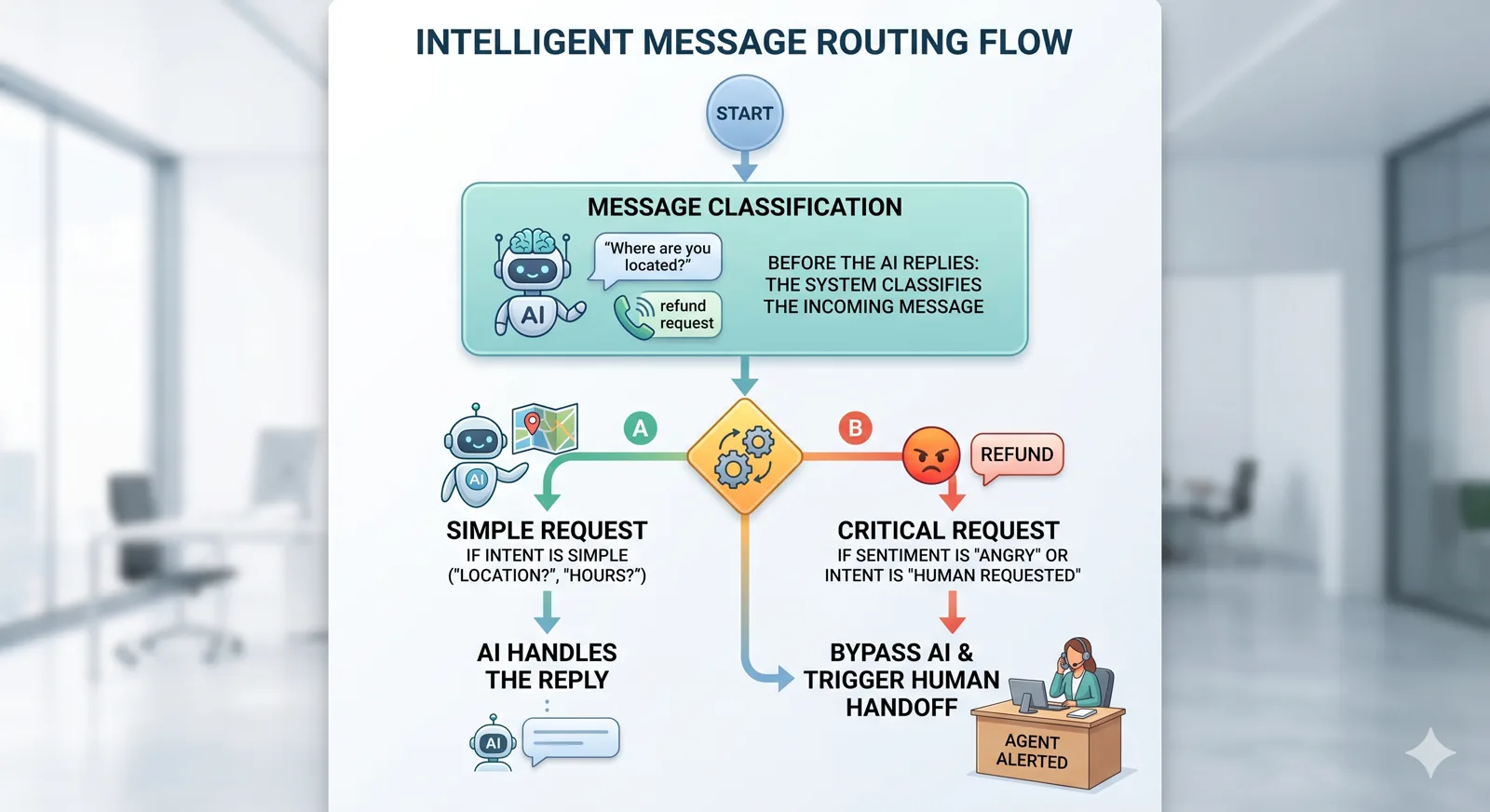
Step 1: Read the message before you reply to it
Before the AI sends a single word back, the system reads what came in. It tags the message for intent (what the customer wants) and sentiment (how they feel about it).
A quiet "What are your trading hours?" goes to the AI. An angry message about a missing order, or the word "refund", skips the bot entirely and goes straight to a human. Same for a customer who has asked the same question three times — the system reads that as the AI failing, and pulls a human in.
You only get one shot at a frustrated customer. Don't waste it on a bot that's already losing.
Step 2: When a human takes over, the bot has to shut up
The single ugliest failure mode is the bot and the human replying at the same time. The customer sees two voices, contradicting each other, and trust evaporates.
Solve it with a simple status flag on each conversation: active means the AI is allowed to reply, paused means it stays silent. The moment a handoff is triggered, the flag flips to paused. The AI stops mid-thought. Every new message from that customer goes straight to the human dashboard until the agent is done.
After 30 minutes of silence from the human, the system can flip the flag back to active — but only after a quick check that the conversation is genuinely finished.
Step 3: Notification & Context Passing
A human handoff is useless if the customer has to repeat their entire story.
When the system triggers a handoff, we push a notification to the support team (via Slack, Microsoft Teams, or a specialized dashboard like Glassix).
Critically, we include the full transcript of the AI's conversation.
Slack Notification: 🚨 New Human Handoff! Customer: +27 82 555 1234 Issue: Order #5544 is missing a part. AI Summary: The customer asked for a tracking link, was told the order was delivered, but claims the package was incomplete. [Link to full chat history]
Step 4: Building the "Handoff Button"
Sometimes, the AI doesn't realize it’s failing. For this, you need a fail-safe. In your AI’s system prompt, you should instruct it to offer a human option if the same question is asked three times.
"I’m sorry, I’m having trouble with that. Would you like me to connect you with a member of our support team?"
If the customer types "Yes" or clicks a WhatsApp Button, the handoff is triggered immediately.
Why This Works for SA Businesses
South Africans value service. We are a relationship-based culture.
If you give a customer an instant answer at 10 PM on a Sunday via a bot, they are impressed. If that same bot fails to solve a R5,000 order issue on Monday morning, they are furious.
The hybrid model allows you to scale your support without losing the "human touch." It allows a team of 2 support agents to handle the workload of 10, because the bot is doing the heavy lifting of answering "How much is delivery?" and "Are you open on public holidays?".
The Infrastructure Stack
- WhatsApp Cloud API: For the messaging layer.
- Node.js/Express: For the backend logic.
- Redis: For session management and bot-status flags.
- OpenAI/Claude API: For the LLM logic.
- Slack API: For the human notification layer.
Final Thoughts
Stop building chatbots that try to be humans. Start building systems that allow humans to be more efficient. The trick to a good AI support system isn't the AI itself; it's the logic that knows when to turn the AI off.
Building a high-volume WhatsApp support engine for your brand? Let's talk on WhatsApp. I help SA companies build intelligent support stacks that actually work.
Frequently asked questions
How do you prevent the AI and human from replying at the same time during a handoff?
We implement a "Pause" state for the AI. When a human takes over, the AI's status in Redis is set to 'paused', ensuring it remains silent. Messages are then routed exclusively to the human dashboard until the human concludes the interaction, preventing dueling responses.
What information is shared with the human agent when a handoff occurs?
Upon handoff, the support team receives a notification via Slack or a specialized dashboard. This critical alert includes the customer's contact number, a brief summary of the issue, and the full transcript of the AI's conversation. This context means the customer doesn't have to repeat themselves.
How does the system determine when to automatically revert to AI after a human interaction?
After 30 minutes of inactivity from the human agent following a handoff, the system can automatically set the bot status back to 'active' in Redis. This auto-revert only happens after a confirmation step, ensuring the human has truly finished with the query.
What is the purpose of the "Handoff Button" if intent classification already triggers human intervention?
The "Handoff Button" acts as a fail-safe. While intent classification catches many cases, the AI might not always recognize its limits. This button, often a WhatsApp Interactive Button, allows the customer to explicitly request a human if the AI is struggling, even if the system hasn't flagged it yet.
Related Articles
- The AI Concierge: Using Bots for High-Quality WhatsApp Lead Qualification
- 10 WhatsApp Templates That Automate 80% of SA Customer Support
- 5 WhatsApp Automation Flows Every Online Store Needs
- Connecting Your Custom CRM to WhatsApp Business API: A Developer's Guide
- Using WhatsApp Interactive Buttons to Triple Your Ecommerce Conversion